Business Automation: The Plain-English Guide for Growing Businesses
Business automation sounds complicated and expensive, buried in jargon like BPA and RPA, but it is neither. Here is what it really means, what you can hand to software, how to choose what is worth automating first, and how to start without an IT department.

The most successful small businesses are quietly running on systems that do the repetitive work for them, while their owners spend the saved hours on customers and growth. Research suggests automation gives back 20 to 35 hours a week to the businesses that adopt it, and nearly nine in ten small companies credit it with helping them compete against far bigger rivals. The tools are cheap, the wins are real, and yet most owners still believe this is something only big corporations with IT departments can afford.
That belief is the single biggest reason good businesses stay stuck doing work a computer could handle. The term "business automation" does not help, buried as it is in enterprise jargon like BPA, RPA and BPM that makes the whole thing sound complicated and costly. This guide cuts through all of it, in plain English: what business automation really is, what you can automate, how to choose what is worth your while, and how to start, often by simply capturing leads on WhatsApp before a competitor does.
What Business Automation Really Is, Without the Jargon
Business automation is the practice of handing your repetitive, rule-based tasks to software, so they happen on their own instead of eating your day. Every business runs on dozens of small jobs that follow a predictable pattern: a lead comes in and needs a reply, an invoice falls due and needs chasing, an appointment is booked and needs confirming. Automation does these the same way every time, instantly, without anyone remembering to.
The newer wave adds a layer of artificial intelligence, so the software can read a messy message, work out what someone means, and respond sensibly rather than only following a rigid script. That is the difference between a system that files data for you and one that holds a real conversation with a customer. You do not need to be technical, and you do not need a big budget, to put either kind to work.
The jargon makes it sound harder than it is, so here is the whole vocabulary translated into plain English:
| The term | What it really means |
|---|---|
| Business process automation (BPA) | Automating a whole multi-step process from start to finish |
| Robotic process automation (RPA) | A software robot that mimics clicks and typing to do repetitive screen work |
| Workflow automation | Passing a task automatically from one step or person to the next |
| Intelligent automation | Automation with AI added, so it can read, judge and decide, not just follow rules |
| Business process management (BPM) | The wider practice of designing and improving those processes |
The myth to drop: business automation is not the preserve of big companies with IT teams. The same tools the giants use now start free or close to it, and a single owner can have a useful automation running this week.
Why It Pays Off Now, With Real Numbers
Automation earns its keep in ways you can measure, not vague promises. The headline is time: by removing the small manual jobs that fill a day, it returns hours that owners pour back into selling, serving and growing. A McKinsey study found that most people who saved time through automation spent it on higher-value work rather than simply doing less.
- It gives you back hours every week. The repetitive jobs that quietly consume your day, from data entry to chasing replies, are exactly what software does best. Owners commonly recover the equivalent of several working days a month, time that goes straight back into the work only a person can do.
- It cuts costly mistakes. A tired human doing the same task for the hundredth time will eventually mistype a figure or forget a step, and some of those slips are expensive. Automation does the job the same way every time, which is why businesses see error rates fall and rework shrink.
- It saves real money. Beyond fewer mistakes, automation trims the cost of the work itself, with some retailers cutting operating costs by around a fifth after automating routine processes. The savings compound as your volume grows and the system keeps pace without new hires.
- It levels the field against bigger rivals. A small team with sharp automation can answer faster, follow up more reliably and look more professional than a competitor ten times its size. Most small companies now say automation is how they punch above their weight.
- It makes customers happier. Instant replies, on-time reminders and consistent follow-up are the things customers quietly judge you on, and automation delivers them without fail. Faster, more reliable service is often the difference between a sale and a silence.
- It grows with you. A manual process that copes with ten enquiries a day buckles at a hundred, while an automated one barely notices the difference. That headroom lets you take on more work without the chaos or the cost of scaling by headcount alone.
The real number: the average automated task saves a business hundreds of hours a year, and those hours rarely vanish into idleness. They get reinvested into the work that genuinely moves the business forward.
What You Can Automate, Organized by Outcome
The enterprise guides sort automation by acronym, which helps nobody. It is far more useful to think in terms of the outcome you want, so here are the areas most growing businesses automate first, each pointing to a deeper guide if you want the detail.
Capturing and Answering Leads
The fastest payback of all, because a lead you reply to in seconds is worth many times one you reach an hour later. Automating an instant, on-brand first response wins work your competitors are simply too slow to claim, and we walk through that exact build further down.
Following Up With Quiet Leads
Most sales are lost in the silence after the first message, not at the first no. A system that nudges every lead who goes quiet, on its own, often recovers more revenue than new advertising, which is the whole point of winning back cold leads.
Booking and Reminders
Empty slots are paid-for time gone to waste, and most no-shows come down to a forgotten appointment. Letting customers book themselves and sending automatic reminders turns a leaky calendar into a dependable one, and is the surest way to stop no-shows.
Answering Customer Questions
A large share of support is the same handful of questions asked over and over, ideal work for an AI agent that answers instantly and hands the hard cases to a person. Knowing the difference between AI agents vs chatbots keeps you from buying a frustrating menu instead of real help.
Invoicing and Getting Paid
Raising invoices the moment work is done and sending polite, escalating reminders pulls payment dates weeks earlier, without a single awkward phone call. It is the job owners most love to hand over, because chasing money by hand is nobody's idea of a good time.
Marketing and Content
Scheduling posts, sending email sequences and drafting copy with AI gives a one-person marketing effort the output of a small team. The work stays consistent even in your busiest weeks, when marketing is usually the first thing to slip.
Admin and Scattered Data
When leads and orders live across a spreadsheet, an inbox and a notebook, things fall through the cracks. Syncing it all into one live pipeline means nothing is lost and you always know where every deal stands.
| Area | What gets automated | The payoff |
|---|---|---|
| Lead response | Instant reply to every enquiry | Win more of the leads you already pay for |
| Follow-up | Timely nudges to quiet leads | Recover sales that would have slipped away |
| Booking | Self-service scheduling and reminders | Fewer no-shows, a fuller calendar |
| Support | Instant answers to common questions | Faster service, a lighter support load |
| Invoicing | Auto-invoices and payment reminders | Get paid faster, chase far less |
| Marketing | Scheduled posts and email sequences | A consistent presence without the hours |
| Admin and data | Lead and order data synced to one place | No more copy-paste, nothing lost |
How to Choose What to Automate First
The advice to "start small" is everywhere, and it is useless on its own, because it never tells you which small thing. The better question is blunt: where is your business quietly losing the most money or time right now? Automate that first, and the system pays for itself before you spend on the next.
A simple way to decide is to weigh each candidate on two axes, the impact it would have and the effort to set it up. The jobs that are high impact and easy to build are where you begin, every time.
| Easy to set up | Harder to set up | |
|---|---|---|
| High impact | Do these first: instant lead reply, reminders | Plan these next: full pipeline, support agent |
| Low impact | Nice-to-haves, do when you have spare time | Usually not worth it |
For most businesses drowning in more enquiries than they can answer, the highest-impact, lowest-effort win is instant lead response, which is why we usually start there. If you want a ready-made running order, our guide to the automations to set up first lays them out in the sequence that pays back fastest.
Rule of thumb: automate the job that bleeds the most money when it is done badly, not the one that is easiest to tick off. The boring, revenue-critical task beats the fun, low-stakes one every time.
A Real Example: A WhatsApp Lead Handler We Built
It helps to see a real one, so here is an actual automation we run, exactly as it is built. A WhatsApp message arrives on the left, the AI agent in the middle does the thinking, and the lead is looked up, logged and answered on the right. The three nodes beneath the agent are the helpers that give it its intelligence, memory and clean output.
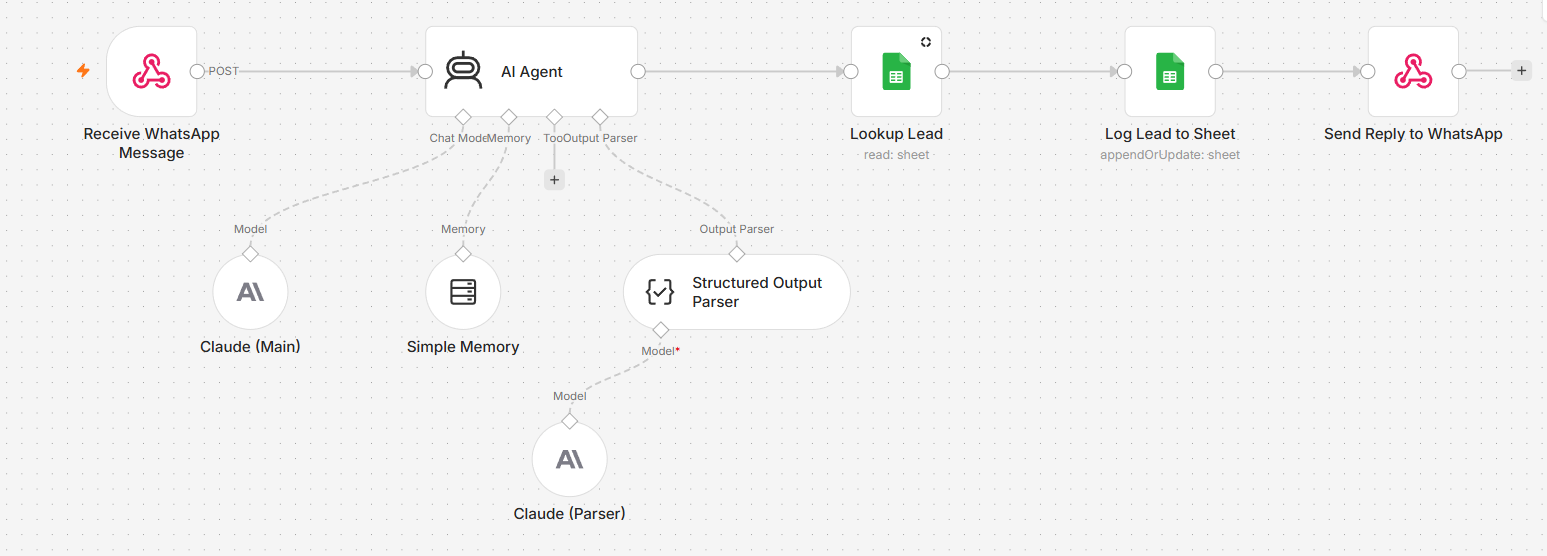
Here is what each node does:
- Receive Message. The trigger. A webhook catches every new WhatsApp message the instant it arrives and starts the flow, at any hour of the day or night.
- AI Agent. Powered by Claude, it reads the message, replies in a natural human voice, works out the customer's intent, and even knows when to stay silent rather than over-message.
- Lookup Lead. It checks your sheet for this phone number, so a returning customer is recognised straight away rather than treated as a stranger.
- Log Lead. It creates or updates the lead's row with their number, status, intent and the time of their last message, so your pipeline is always current.
- Send Reply. It sends the agent's reply straight back to the customer on WhatsApp, closing the loop in seconds.
Underneath the agent sit three quiet helpers that do the heavy lifting. Claude supplies the intelligence, a memory node remembers the last several messages so the chat flows like a real conversation, and an output parser forces clean, structured data on every reply. Together they are what separate a sharp assistant from a clumsy bot.
The result is a lead that arrives warm, qualified and logged, with not a single manual step from you. The same chain that would swallow a busy owner's whole morning runs quietly in the background, every time, which is the heart of a real instant lead response system.
Where Business Automation Goes Wrong, and What to Keep Human
A guide that only sells the upside is not worth your trust, because automation has real failure modes, and the owners who win design around them. The goal is never to automate everything, only the parts that genuinely should be, while keeping a person on the moments that matter. Watch for these in particular:
- Over-automation that feels cold. Just because a step can be automated does not mean it should be, especially at the emotional points of a customer relationship. A warm human reply at the right moment is worth more than a hundred instant automated ones, so choose with care what stays personal.
- Silent failure. The worst breakages are the quiet ones, where a flow stops and no alarm sounds, only a slow drought of leads or replies. Simple alerts that tell you the moment something breaks are what keep a small fault from becoming an expensive one.
- Automating a broken process. Automation makes a process faster, which means a bad process simply produces its bad result faster. Fix and simplify the steps by hand first, then automate the version that genuinely works.
- Bad or messy data. A system fed wrong details will confidently act on them, sending the right message to the wrong person. Clean, well-organised data is the quiet foundation that decides whether an automation helps or embarrasses you.
This balance is clearest on messaging channels, where a personal touch matters most, which is why our guide to what to keep human is worth reading before you automate any customer conversation.
Reality check: the aim is a business that feels more personal, not less, with the busywork handled quietly in the background. Keep a human on judgement, empathy and the awkward exceptions, and let the software take the rest.
How to Get Started: DIY or Done-for-You
Starting to automate your business is simpler than the jargon suggests, and it follows the same short path whichever route you take. Audit your week and note the repetitive jobs, pick the single one that costs you the most, build or buy a solution for just that, measure the result, and only then add the next. One proven automation at a time beats a sprawling system nobody trusts.
If you enjoy the tinkering and the stakes are low, doing it yourself is genuinely viable, and the place to begin is choosing the right tool. Our rundown of the best AI automation tools shows what fits each task, with honest prices and the catch on each.
If the automation touches your revenue and you would rather it simply worked from day one, having it built for you is the safer call. That is the heart of done-for-you vs DIY: you skip the learning curve and the late-night debugging, and own a system that runs without you. The tools are the same either way, the only question is whose evenings get spent wiring them together.
Not sure where your business is leaking time?We will map your week, find the one automation that frees you fastest, and build it done-for-you, wired into the tools you already use.Book a callFrequently Asked Questions
What is business automation?
Business automation is the use of software to carry out repetitive, rule-based tasks on its own, so your team does not have to. It covers everything from sending an instant reply to a new lead to raising invoices and chasing payment, and the newer, AI-powered kind can read messages and make simple decisions too. The goal is to remove the busywork that fills a day and free your people for work that needs a human.
What can you automate in a small business?
Far more than most owners expect, including lead response, follow-up, booking and reminders, customer support, invoicing, marketing and the syncing of data between your apps. A good rule is that any task which is repetitive and follows a predictable pattern is a candidate. The smartest move is to start with the one that costs you the most time or money today.
How much does business automation cost?
Less than most people fear, since many capable tools start free or in the range of $10 to $50 a month each. Across a whole small business the realistic spend runs from roughly $50 to a few hundred dollars a month, before the value of your saved time is counted. Having a system custom-built costs more upfront, but you then own it outright rather than paying forever.
What is the difference between business automation and business process automation?
Business automation is the broad idea of using software to handle tasks for you, while business process automation, or BPA, is the slice that automates a whole multi-step process from beginning to end. In day-to-day terms the distinction rarely matters to a small business owner. What matters is the outcome you want, not which label a vendor puts on it.
Do I need to be technical to automate my business?
For most popular tools, no, since they are built to be set up by pointing and clicking rather than writing code. A confident owner can put a simple automation live in an afternoon. The technical question only returns for complex, multi-step systems, which is the point many people choose to have it built for them instead.
What should I automate first?
Start with the job that costs you the most when it is done badly, which for most businesses is responding to new leads quickly. It is high impact and easy to set up, so it pays for itself fast and proves the idea before you spend on anything bigger. From there, add the next automation only once the first is clearly working.
Will business automation replace my staff?
It is far better understood as a way to remove the repetitive busywork so your people can spend their hours on the work that needs a human. Automation handles the instant replies, the chasing and the routine questions, while your team focuses on relationships, judgement and the tricky cases. The aim is a lighter workload, not a smaller team.
Start With the One Job That Bleeds Money
Business automation is far simpler, cheaper and more within reach than the jargon makes it sound. Strip away the acronyms and it comes down to a single, practical move: find the repetitive job that costs your business the most, hand it to software, and reclaim the hours it was quietly eating. Then do it again with the next one, once the first has proven itself.
You do not need to automate everything, and you certainly do not need an IT department to begin. You need one well-chosen automation, built properly, doing real work from day one. If you would like an honest view of where your business is leaking time and which automation would pay you back fastest, that is a short conversation away.